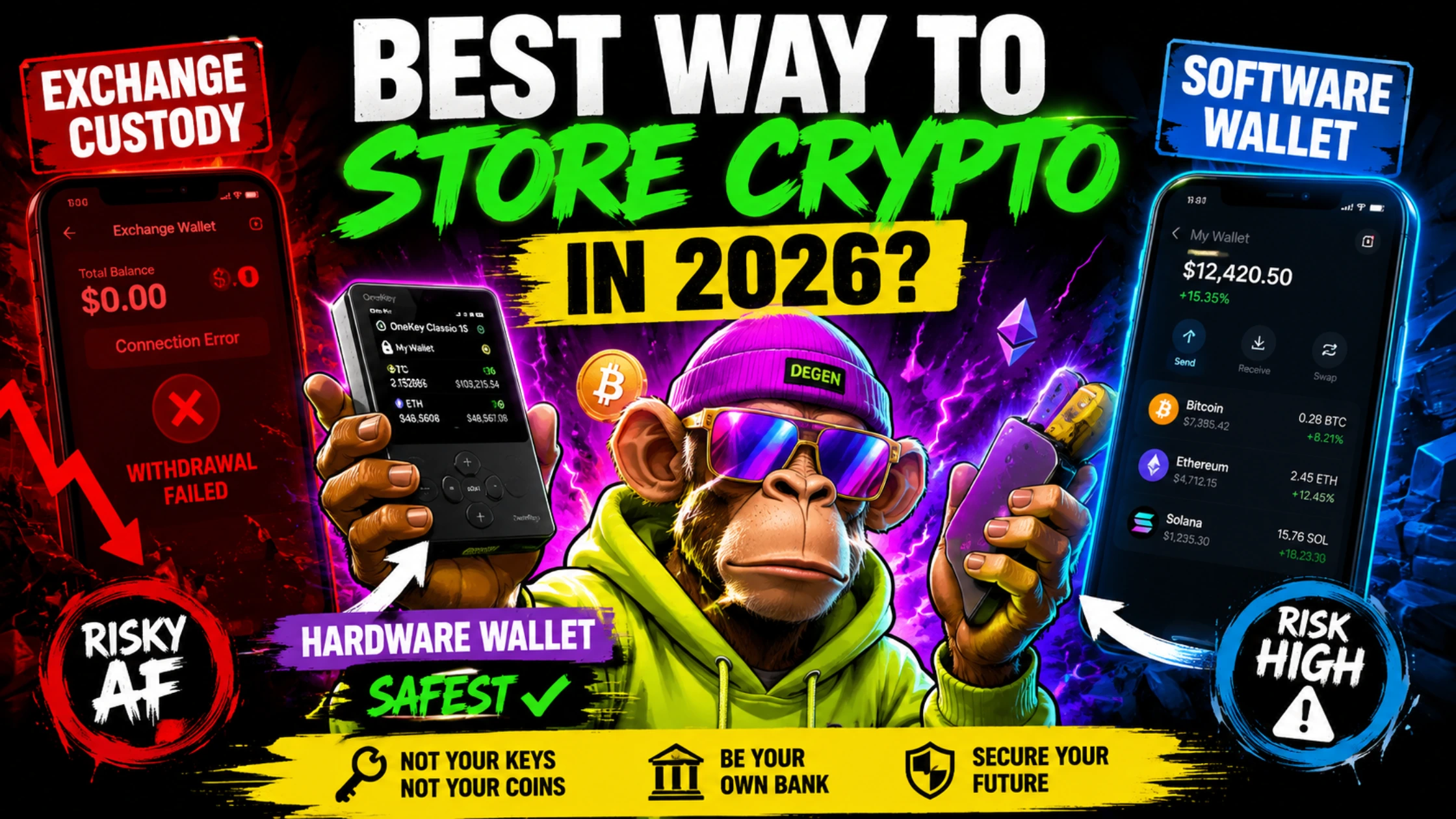
Hardware wallet vs software wallet vs exchange custody — the verified risk, the real cost, and why OneKey Classic 1S is the best value cold wallet in 2026.
The number nobody calculates before they lose everything
There is a specific calculation that almost nobody does before choosing where to hold their cryptocurrency, and the absence of that calculation is why smart, careful people still lost billions in exchange collapses that anyone could have predicted using basic expected value reasoning.
The calculation: multiply the probability of a total loss event by the amount you hold. If you hold $10,000 on an exchange and the annual probability of total loss (collapse, hack, withdrawal freeze) is even 2%, the expected annual loss is $200. A hardware wallet costs $99. The insurance is worth more than the premium in year one and has zero ongoing cost in years two through infinity.
This article performs that calculation properly for all three custody models — exchange, software wallet, and hardware wallet — and builds the Decentralised News Custody Risk Score (DNCRS) that maps each model’s risk to your specific portfolio size. The conclusion is not that exchange custody is always wrong or hardware wallets are always right. The conclusion is that the correct choice is different for different portfolio sizes and different use cases, and most people are in the wrong custody model for the amount they actually hold.

Understanding the three custody models
Before the risk analysis, a precise definition of each model is necessary, because the marketing language around each has become muddied.
Model 1: Exchange custody
When you hold cryptocurrency on Coinbase, Bybit, OKX, or any centralised exchange, you do not own Bitcoin or Ethereum. You own a claim on the exchange’s reserves — the exchange’s promise that it holds the equivalent amount in its treasury. The distinction is not semantic. FTX held $8.7 billion in client claims. Its treasury had a fraction of that. The gap was the loss that destroyed thousands of portfolios.
Exchange custody: the exchange holds the private keys. You hold a balance number on a screen. If the exchange fails, the balance number becomes worthless regardless of what the blockchain shows.
When exchange custody is appropriate: Funds you are actively trading. Capital you need immediate access to for entering or exiting positions. Amounts small enough that total loss would not materially affect your financial wellbeing.

Model 2: Software wallets (hot wallets)
Software wallets — MetaMask, Trust Wallet, Exodus, Phantom — store private keys on your device. The keys are encrypted with your password, but they exist on hardware connected to the internet. You genuinely own your crypto (the keys are yours), but the device holding those keys is vulnerable to malware, phishing attacks, SIM swaps that compromise 2FA, and device theft.
The critical distinction between a software wallet and exchange custody: you are responsible for security rather than delegating it to the exchange. This is a meaningful upgrade over exchange custody. It is not equivalent to hardware wallet security.
When software wallets are appropriate: Daily DeFi activity where frequent transactions make hardware wallet signing impractical. Small amounts that do not justify the hardware cost. Access to chains not yet supported by your hardware wallet.
Model 3: Hardware wallets (cold wallets)
A hardware wallet is a dedicated physical device whose sole function is generating and storing private keys in an isolated secure element that never connects to the internet. When you sign a transaction, the transaction data moves from your computer to the device, is signed inside the secure element, and the signed transaction — never the private key — returns to your computer.
The private key generated by your hardware wallet has never been on the internet. Not during setup. Not during transactions. Not during firmware updates (the firmware is signed and verified without the key ever leaving the device). Remote hacking is not possible because there is nothing to reach.
When hardware wallets are the right choice: Any amount above $500 intended for holding. Long-term positions you do not need immediate access to. Assets you would be materially harmed to lose.

The Decentralised News Custody Risk Score
The DNCRS rates each custody model across five dimensions, each scored from 1 to 10 (10 = safest):
|
Dimension |
Exchange custody |
Software wallet |
Hardware wallet |
|
Counterparty risk |
2 |
9 |
10 |
|
Remote hack resistance |
4 |
5 |
10 |
|
Phishing resistance |
6 |
5 |
8 |
|
Physical loss/theft recovery |
10 |
7 |
7 |
|
Ease of use |
10 |
8 |
7 |
|
DNCRS Total |
32/50 |
34/50 |
42/50 |
Exchange custody (32/50): Scores highest on ease of use and physical loss recovery (if the exchange goes down you lose nothing from physical hardware failure) but lowest on counterparty risk — the category that causes total portfolio loss events.
Software wallets (34/50): A meaningful upgrade on counterparty risk but vulnerable on remote hack resistance and phishing. The average DeFi user with a MetaMask wallet has typically approved dozens of smart contracts — any one of which could include malicious code with token approval that drains the wallet.
Hardware wallets (42/50): The clear winner on the risk dimensions that matter most. The deduction from a perfect score comes from physical loss/theft recovery complexity — if you lose a hardware wallet without having stored your seed phrase correctly, recovery is impossible. This risk is entirely controlled by the user’s own procedures.

The expected annual loss calculation
The following model uses documented historical data from exchange collapses and security incidents to estimate the expected annual loss from each custody model.
Exchange custody expected annual loss:
Major exchange total loss events since 2014: Mt. Gox (2014), Bitfinex partial (2016), Cryptopia (2019), FCoin (2020), FTX (2022), Celsius (2022), Voyager (2022), Genesis (2023). The documented collapse events involving total or near-total client loss number 8 significant events across 12 years, among approximately 500 meaningful exchanges that operated during that period.
An approximate annual probability of any given exchange experiencing a total loss event: approximately 1–2% per year across the industry. For tier-one exchanges (Binance, Bybit, OKX, Kraken), the probability is substantially lower — estimated at 0.1–0.5% annually based on regulatory status, proof of reserves, and balance sheet transparency.
Expected annual loss on $10,000 at a tier-one exchange (0.3% annual collapse probability): $30/year. Expected annual loss on $10,000 at a mid-tier exchange (1.5% probability): $150/year. Expected annual loss on $100,000 at a mid-tier exchange: $1,500/year.
Software wallet expected annual loss:
Aggregate data on software wallet attacks is harder to isolate from total DeFi exploit data. A reasonable estimate from Chainalysis, blockchain security researchers, and anecdotal user data suggests approximately 2–4% of active software wallet users experience a meaningful security incident annually — primarily through phishing, malicious contract approvals, or seed phrase compromise.
Expected annual loss on $10,000 in a software wallet (2% annual incident probability, 80% of funds at risk in an incident): $160/year. Expected annual loss on $100,000: $1,600/year.
Hardware wallet expected annual loss:
The primary risk for hardware wallets is user-error: losing the seed phrase without a backup. This risk is entirely controlled by user procedure. Assuming competent seed phrase backup (written on paper, stored separately from the device), the annual risk of total loss from hardware failure or user error is estimated at under 0.1%.
Expected annual loss on $10,000 in a hardware wallet (0.1% annual risk): $10/year. Expected annual loss on $100,000: $100/year.

The insurance premium calculation
|
Portfolio size |
Exchange annual risk |
Software wallet annual risk |
Hardware wallet annual risk |
Hardware wallet cost |
Break-even holding period |
|
$1,000 |
$3–$15 |
$16 |
$1 |
$79–$99 |
6–10 years |
|
$5,000 |
$15–$75 |
$80 |
$5 |
$79–$99 |
1–2 years |
|
$10,000 |
$30–$150 |
$160 |
$10 |
$79–$99 |
Under 1 year |
|
$50,000 |
$150–$750 |
$800 |
$50 |
$79–$99 |
Under 3 months |
|
$100,000 |
$300–$1,500 |
$1,600 |
$100 |
$249 |
Under 3 months |
The conclusion from this table: For any portfolio above $5,000 intended for holding, a hardware wallet pays for itself in expected annual risk reduction within two years. For portfolios above $50,000, the break-even is under three months. The insurance is cheaper than the premium by a factor of three to fifteen times once you cross $10,000.
Why the open-source question matters more in 2026 than it did in 2022
The hardware wallet market’s trust landscape changed permanently in May 2023 when Ledger introduced Ledger Recover — an optional service that would allow a user to recover their seed phrase through a third-party identity verification process. The feature was optional. The public reaction was not calm.
The specific concern: if Ledger’s firmware could be updated to extract a seed phrase for the Recover feature, what prevents a future firmware update — voluntary or compelled by a government — from extracting that same seed phrase without user consent? Ledger’s closed-source firmware means users must trust Ledger’s word that no such extraction pathway exists.
This is not a theoretical concern. Governments have compelled technology companies to provide user data under national security orders. A hardware wallet whose firmware is closed-source depends entirely on the manufacturer’s integrity and independence from government compulsion.
Open-source firmware eliminates this concern. When firmware is open source and independently audited, any extraction pathway would be visible in the code. Security researchers would identify it. The manufacturer’s word is replaced by mathematical verification.
OneKey Classic 1S firmware and apps are fully open source and reproducible on GitHub, with reproducible builds and independent audits by SlowMist. This means anyone — any security researcher, any developer, any user — can verify that the OneKey firmware does not contain any pathway for seed phrase extraction. The security claim is verifiable, not promised.
This is the specific property that makes OneKey’s open-source architecture a genuine competitive advantage in 2026, not just a marketing differentiator.
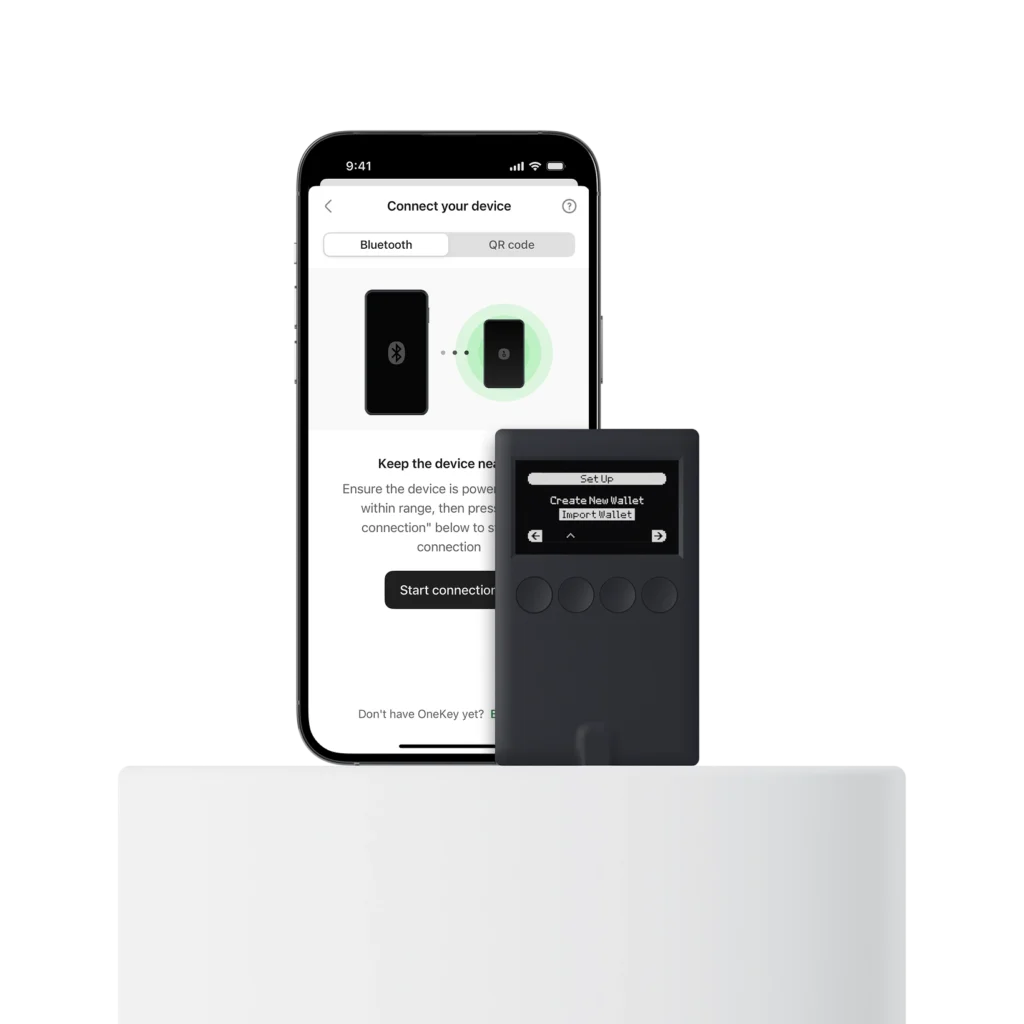
The OneKey Classic 1S: the central recommendation
Price: $99 (use code 46Z9TD for 10% off = $89.10) at OneKey DNCRS hardware wallet score: 9.2/10 Backed by: Coinbase Ventures, Dragonfly Capital Trustpilot: 4.1/5 from 250+ verified reviews Independent audit: SlowMist
What it is
The OneKey Classic 1S uses CC EAL6+ certified secure chips — the same top-tier certification found in high-security applications like government IDs and payment systems. OneKey went a step further by including two secure elements, not just one. The EAL6+ (Evaluation Assurance Level 6+) is the highest security certification applied to consumer hardware — the same level used in banking-grade payment systems, biometric passports, and government identity documents. Two of them.
A budget wallet priced at $99 with open-source code, support for 30,000 assets, and compatibility with desktop and mobile apps — supporting over 30,000 cryptocurrencies, NFTs, and more than 100 blockchain networks.
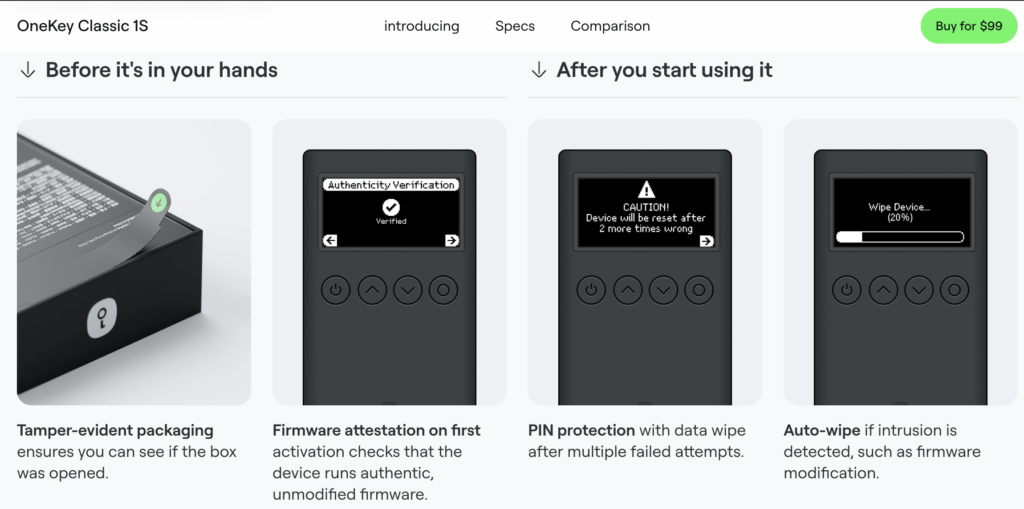
Key specifications
Security:
- Dual EAL6+ certified secure elements
- All private keys generated inside the secure element — never exposed
- PIN + auto-wipe (10 failed attempts wipes the device to factory settings)
- Passphrase support — optional 13th BIP39 word creates hidden wallets from the same seed phrase
- Firmware authenticity check on every connection
- 100% open-source firmware and apps, publicly audited by SlowMist
Connectivity:
- Bluetooth 5.0 (for mobile use with OneKey app on iOS and Android)
- USB-C (for desktop connection on Windows, macOS, Linux, ChromeOS)
- Compatible with MetaMask, Trezor web wallet, Bitcoin Core + Specter, and other third-party interfaces
Asset support:
- 30,000+ cryptocurrencies and NFTs
- 100+ blockchain networks
- Bitcoin, Ethereum, Binance Smart Chain, Solana, Polygon, Arbitrum, Optimism, Sui, Kaspa, and emerging chains
- Integrated staking, NFT management, and DeFi access
Privacy:
- No KYC required — no account, no identity verification, no registration
- Your financial activity is entirely private
Form factor: OneKey Classic 1S Pure: card size 86×52×5.2mm, approximately 18.3g, fits in a wallet and has a device screen for confirmation. Credit-card sized, thinner than most passports, fits in a standard cardholder.
Zero fees: Same-chain stablecoin swaps and perpetual contract trading within OneKey’s integrated interface incur zero fees — a genuine operational advantage over wallets that charge conversion fees.
The user experience
Four buttons, physical, straightforward to use — much more clear and simple to use than a Ledger Nano. The screen is small but clear enough to check your addresses and transactions. Compatibility with almost any device or platform: iOS, Android, macOS, Windows, Linux, and even ChromeOS.
The four-button interface is a consistent point of positive differentiation from Ledger’s two-button navigation, which multiple independent reviewers describe as confusing for new users. The Classic 1S has a “fast, intuitive setup with clear seed phrase and PIN flows,” broad multi-chain support across 60+ blockchains, and backing from notable investors including Coinbase Ventures and Dragonfly Capital.
OneKey Classic 1S vs competitors at the same price point
Both the Ledger Nano S Plus and OneKey Classic 1S are priced similarly ($70–$90 for the Pure variant) and skip the battery — the one device that removes the “dead battery after 10 years” problem. The Classic 1S Pure — the battery-free, USB-C only version — starts at approximately $79, making it the most cost-effective EAL6+ dual-chip hardware wallet available anywhere.
|
Feature |
OneKey Classic 1S |
Ledger Nano X |
Trezor Safe 3 |
|
Price |
$99 ($89 with 46Z9TD) |
$149 |
$79 |
|
Secure chips |
Dual EAL6+ |
Single EAL6+ |
Single EAL5+ |
|
Open source |
100% (firmware + hardware) |
Partial (firmware partial) |
100% |
|
KYC required |
No |
May require for Ledger Live |
No |
|
Asset support |
30,000+ / 100+ chains |
5,500+ |
8,000+ |
|
Connectivity |
Bluetooth + USB-C |
Bluetooth + USB |
USB only |
|
Independent audit |
SlowMist |
Multiple |
Multiple |
|
Recover controversy |
Not applicable |
2023 controversy |
Not applicable |
The table’s most significant entries: OneKey Classic 1S uses dual EAL6+ chips versus Ledger’s single EAL6+. OneKey is 100% open source versus Ledger’s partial open source. OneKey requires no KYC. At $89 with the discount code versus $149 for Ledger Nano X, the OneKey Classic 1S delivers equivalent or superior security credentials at 40% lower cost.
Get 10% off: OneKey Classic 1S — use code 46Z9TD at checkout.
The full OneKey product lineup
OneKey produces a range of hardware security products beyond the Classic 1S. Here is the full lineup for different user needs.
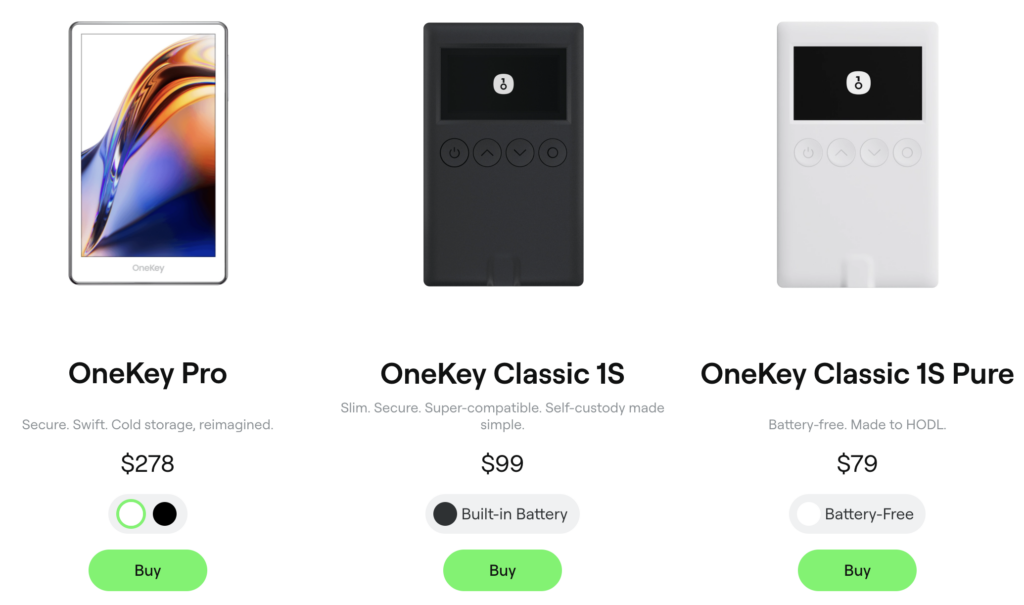
OneKey Classic 1S Pure — $79
The battery-free, cable-only version of the Classic 1S. Identical security architecture (dual EAL6+, open source), identical asset support, identical software compatibility. The absence of a battery is a feature for long-term holders: no battery means no battery degradation over years or decades of storage. If you are buying a hardware wallet to store Bitcoin for ten years, a device without a battery is a device that works identically in ten years as it does today.
Best for: Long-term Bitcoin and crypto holders who access their wallet infrequently and prioritise longevity over portability.
Shop OneKey Classic 1S Pure — Code 46Z9TD for 10% off.
OneKey Classic 1S — $99
The battery-equipped version adds Bluetooth connectivity and the ability to use the device without a USB cable — connecting wirelessly to the OneKey mobile app on iOS or Android. The battery lasts through multiple signing sessions before needing a recharge. For active DeFi users who sign transactions from a phone, the Bluetooth capability transforms the workflow.
Best for: Active DeFi users, mobile-first traders, and anyone who wants the full Classic 1S feature set with wireless convenience.
Shop OneKey Classic 1S — Code 46Z9TD for 10% off.
OneKey Mini — Compact form factor
OneKey Mini is the most portable device in the lineup — smaller than the Classic 1S with similar security architecture. Designed for users who want genuine hardware wallet security in the smallest possible form factor. The reduced size comes with a smaller display, which some users find less comfortable for address verification.
Best for: Travel, minimalist setups, and users who want a device that genuinely fits in a small wallet or key ring.
Shop OneKey Mini — Code 46Z9TD for 10% off.
OneKey Touch — Touchscreen entry
OneKey Touch introduces a colour touchscreen, making it the most visually intuitive device in the lineup for users who find the button-based interface less accessible. The touchscreen enables richer display of NFT previews, transaction details, and wallet management.
Best for: NFT collectors, users who want the most accessible interface, and anyone upgrading from a mobile software wallet who is accustomed to touchscreen interaction.
Shop OneKey Touch — Code 46Z9TD for 10% off.
OneKey Pro — $278 (The flagship)
The OneKey Pro is built with four EAL6+ secure elements — about as serious as hardware security gets. Features include a colour touchscreen, Bluetooth, NFC, wireless charging, fingerprint verification, and firmware verification — supporting multi-chain and mobile scenarios.
The OneKey Pro has a colour touchscreen that looks incredible, but drains more battery. If you want the most layers between your keys and the internet, OneKey Pro makes a strong case.
Four EAL6+ chips is a specification that no other consumer hardware wallet in the market matches. The fingerprint unlock adds biometric authentication to the hardware security stack. This is genuinely the most technically secured consumer hardware wallet available in 2026.
Best for: High-net-worth holders, institutional-adjacent users, active traders managing large positions across multiple chains, and anyone who wants the absolute maximum in hardware security.
Shop OneKey Pro — Code 46Z9TD for 10% off.
OneKey KeyTag — Metal seed phrase backup
The OneKey KeyTag is a steel seed phrase backup plate — a physical metal storage medium for your recovery phrase. Unlike paper (which burns, tears, and degrades), steel survives fire, flood, and decades of storage. The KeyTag provides the permanent seed phrase backup that every serious hardware wallet user needs.
Best for: Anyone serious about long-term seed phrase security. A hardware wallet without a secure seed phrase backup is only as secure as the paper you write your recovery phrase on.
Shop OneKey KeyTag — Code 46Z9TD for 10% off.
The full competitive landscape: where OneKey sits
Ledger (Nano X, Nano S Plus, Stax, Flex)

Affiliate access: Ledger
Ledger remains the most widely deployed hardware wallet brand globally, with the largest third-party integration ecosystem. Every major DeFi protocol, most CEXs, and virtually all web3 applications support Ledger natively. The brand’s longevity (founded 2014) and institutional relationships give it legitimacy that newer brands are still building.
The recommendation case: Users who prioritise maximum third-party integration compatibility and are willing to pay the $149 premium for the Ledger Nano X or $79 for the Nano S Plus. The Ledger Flex ($249) and Ledger Stax ($399) address the premium market with E-Ink displays.
The OneKey advantage: At $99, the OneKey Classic 1S matches Ledger Nano X’s core security architecture (EAL6+ chips, offline key storage, Bluetooth) while adding dual secure elements, fully open-source firmware, and a $50 price advantage. For users who are not tied to Ledger’s specific ecosystem, OneKey Classic 1S is the objectively stronger value proposition.
CoolWallet
Affiliate access: CoolWallet Pro
CoolWallet takes a different design philosophy — a card-form factor that fits in a physical wallet and uses Bluetooth exclusively. The CoolWallet Pro ($89) and CoolWallet S ($49) are the primary products.
CoolWallet’s strongest use case is the user who wants a hardware wallet that integrates with their physical life — stored with credit cards, taken everywhere. The card form factor removes the “separate device” friction that causes some users to leave funds on exchanges “just for now.” If the hardware wallet is always in your wallet, you always have it.
The recommendation case: Mobile-first users, frequent travellers, and anyone who wants maximum portability and a form factor that is genuinely always present. The CoolWallet Pro’s NFC capability enables tap-to-sign interactions that are faster than USB-connected alternatives.

Trezor (Safe 3, Safe 5, Model One)
Trezor was the first hardware wallet (2013) and remains the open-source standard alongside OneKey. The Trezor Safe 3 ($79) uses an EAL6+ chip and is fully open source. The Safe 5 ($169) adds a colour touchscreen. The primary limitation is that Trezor does not support Bluetooth — all connections are USB-only, which some users find impractical for mobile DeFi workflows.
For users whose primary concern is open-source security and who do not need Bluetooth connectivity, Trezor Safe 3 at $79 is a legitimate alternative to the OneKey Classic 1S Pure at the same price point.
The portfolio-based recommendation
The correct hardware wallet choice is not universal. Different portfolio sizes and use cases warrant different solutions.
Under $500: Keep funds on a reputable exchange (Bybit, OKX) with strong proof-of-reserves and 2FA enabled. The hardware wallet cost is not justified by the expected risk reduction at this portfolio size based on tier-one exchange failure probability.
$500–$5,000: The OneKey Classic 1S Pure ($79, use code 46Z9TD at OneKey) is the correct entry point. Dual EAL6+ chips, open source, battery-free for longevity, at the lowest price for genuine hardware security. The break-even against exchange risk is under 18 months at this portfolio size.
$5,000–$50,000: OneKey Classic 1S ($99 with 46Z9TD = $89) or Ledger Nano X ($149). OneKey wins on value-adjusted security (dual chips, open source, no KYC). Ledger wins on ecosystem integration breadth. Both are correct choices at this level — pick based on whether you need Ledger’s specific integrations.
$50,000–$250,000: OneKey Pro ($278 with 46Z9TD applied = $250 approximate) or Ledger Stax ($399). OneKey Pro’s four EAL6+ chips and fingerprint authentication represent the strongest consumer hardware security available. Consider adding a CoolWallet Pro as a secondary device for mobile access, with the majority of funds on the OneKey Pro.
$250,000+: Multi-signature setup using multiple hardware wallets from different manufacturers. 2-of-3 multisig across OneKey Pro + Ledger + Trezor means no single device compromise or loss results in fund loss. The OneKey KeyTag steel seed phrase backup is non-optional at this level. Consider a geographically distributed seed phrase storage arrangement.

The setup protocol: hardware wallet security in practice
Purchasing a hardware wallet and using it incorrectly is worse than the marketing suggests. Here is the specific protocol that eliminates the primary user-error risks.
Step 1 — Verify device integrity on arrival. Check that the device arrives in sealed packaging with no evidence of tampering. A device that has been pre-configured or shows a pre-generated seed phrase should be immediately returned — it has been compromised.
Step 2 — Set up the device offline. Do not connect the device to a computer during initial setup if possible. Generate your seed phrase on the device itself. Do not use a pre-generated seed phrase provided by any source including the manufacturer’s app.
Step 3 — Record the seed phrase on paper or metal. Write every word of the 24-word seed phrase legibly on paper immediately. If you use a OneKey KeyTag metal backup, stamp each word into the metal plate. Never photograph the seed phrase. Never type it into any digital device. The seed phrase and the hardware wallet must be stored in separate physical locations.
Step 4 — Set a strong PIN. The PIN prevents physical access to the device if it is stolen. A six-digit PIN provides 1 million possible combinations. The auto-wipe feature (10 failed attempts) means a stolen device is useless to anyone without your PIN.
Step 5 — Add a passphrase (optional, recommended for significant amounts). The BIP39 passphrase (the optional 13th word) creates a completely separate hidden wallet derived from the same seed phrase. A thief who obtains your seed phrase cannot access your passphrase-protected wallet without the passphrase. Your primary balance lives in the passphrase-protected wallet; a small decoy balance lives in the standard wallet. This provides physical coercion resistance.
Step 6 — Test recovery before funding. Wipe the device, restore from your seed phrase, verify the addresses are identical. This confirms your seed phrase was recorded correctly before you fund the wallet.
Step 7 — Transfer incrementally. Send a small test transaction first. Verify receipt on the device. Then transfer the full amount.

The conclusion the risk math produces
The expected annual loss from exchange custody at any portfolio above $5,000 exceeds the one-time cost of a hardware wallet within two years at tier-one exchanges and within months at mid-tier exchanges. The insurance premium is less than the insurance value at every significant portfolio size.
The OneKey Classic 1S at $89 (with code 46Z9TD) represents the highest value-adjusted hardware wallet security available in 2026: dual EAL6+ chips matching the security architecture of wallets costing twice as much, 100% open-source firmware that can be independently verified by anyone, no KYC requirement protecting your financial privacy, and support for 30,000+ assets across 100+ chains that covers virtually every asset in any portfolio.
The choice between hardware wallet manufacturers is secondary to the decision to use a hardware wallet at all. Every portfolio above $5,000 is a portfolio that should not be entirely on an exchange. Every portfolio above $50,000 is a portfolio that should be entirely in self-custody.
The OneKey Classic 1S is where to start.
Get 10% off with code 46Z9TD: OneKey hardware wallets
Frequently asked questions
What if I lose my hardware wallet?
The hardware wallet itself is replaceable. The seed phrase is not. If you lose your OneKey Classic 1S but have your 24-word seed phrase safely stored, you can purchase any BIP39-compatible hardware wallet (OneKey, Ledger, Trezor) and restore your wallet completely. The device is the interface; the seed phrase is the wallet.
Can a hardware wallet be hacked remotely?
No. Remote hacking requires an attack surface — something connected to the internet. A hardware wallet’s secure element is not connected to the internet during any operation. Transactions are signed inside the secure element and only the signed transaction output leaves the device. There is no pathway for a remote attacker to reach the private key.
What happens when OneKey the company ceases to exist?
OneKey’s fully open-source architecture means its firmware continues to exist and function regardless of the company’s status. Additionally, because OneKey uses standard BIP39 seed phrases, any wallet generated on an OneKey device can be restored on any BIP39-compatible hardware wallet from any manufacturer. Company dependency is minimal.
Does OneKey work with MetaMask?
Yes. The OneKey Classic 1S is compatible with MetaMask, Trezor web wallet, Bitcoin Core + Specter, and many other third-party wallets and platforms.
This article is for informational and educational purposes only. Hardware wallet security depends on correct user procedure — primarily proper seed phrase recording and storage. No hardware wallet eliminates all risk if the seed phrase is compromised. This does not constitute financial advice.
Affiliate disclosure: Decentralised News maintains affiliate relationships with OneKey (code 46Z9TD, 10% discount to readers, 18% commission to Decentralised News), Ledger, CoolWallet, Bybit, and OKX. Links in this article include affiliate codes. Editorial assessments are not influenced by commercial relationships.
Published by Decentralised | Author: Heath Muchena | May 2026
10 Safest Crypto Wallets to Protect Your Assets
How to Buy Crypto Using Telegram & Web3 Wallets (2026)